W-Prolog
 Links2Go Key Resource Prolog Topic |
|
Links2Go Key Resource Prolog Topic |
|
1. Introduction 1.1 The Distribution 2. The Language 3. Usage 3.1 Embedding the W-Prolog Engine 4. The User interface 4.1 Applet 4.2 Application 5. Comments 5.1 Bugs 5.2 Further Work 6. Related Work Appendices A. History B. Legalese |
W-Prolog has a nicer user interface than most Prolog systems (which typically provide a command line interface). It provides simple tracing and has an (optional) occur check.
The W-Prolog system is small and comparatively simple. However it is not particularly fast.
W-Prolog has been:
NEW W-Prolog is now also available as a clickable jar file (wp.jar)
If you want to try W-Prolog now (and are viewing this with a Java capable browser) just click the button below.
Program ::= Rule | Rule Program
Query ::= Term
Rule ::= Term . | Term :- Terms .
Terms ::= Term | Term , Terms
Term ::= Number | Variable | AtomName | AtomName(Terms)
| [] | [Terms]
| [Terms | Term]
| print(Term)
| nl
| eq(Term , Term)
| if(Term , Term , Term)
| or(Term , Term )
| not(Term)
| call(Term)
| once(Term)
Number ::= Digit | Digit Number
Digit ::= 0 | ... | 9
AtomName ::= LowerCase | LowerCase NameChars
Variable ::= UpperCase | UpperCase NameChars
NameChars ::= NameChar | NameChar NameChars
NameChar ::= a | ... | z | A | ... | Z | Digit
Comments begin with a % and terminate at the end of the line or begin with /* and terminate with */.
Note that as of version 1.2 code of the form p(X) :- X will not work. Instead, use the new builtin call as follows: p(X) :- call(X).
Note also, that the clauses defining a predicate need to be contiguous. So, for example, use:
a :- b.
a :- c.
b :- defn.
c :- defn.
and not:
a :- b.
b :- defn.
a :- c.
c :- defn.
To run W-Prolog as an applet construct an HTML file containing the tag:
<center>
<h1>W-Prolog</h1>
<applet code=WProlog.class width=120 height=65>
</applet>
</center>
and use netscape (or internet explorer) to view this file.
Alternatively, just use the address http://winikoff.github.io/software/wp/.
To run W-Prolog as a standalone application you need to have the Java Development Kit (JDK). The command is java WProlog where the directory containing the class files must be in the CLASSPATH.
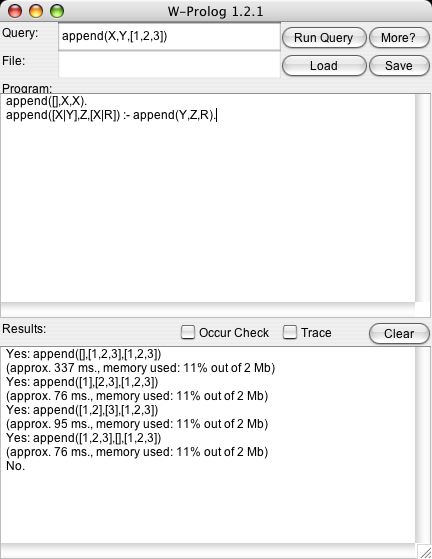
The top row (labeled Query) contains a text field into which a Prolog atom can be typed (for example append(X,Y,[1,2,3,4]) - note that no terminating full stop is necessary). The first button (Run Query) will start the query running and the second (More) will seek alternative solutions to a succesful query.
The top text area (labeled Program) contains the program text. The bottom text area (labeled Results) contains the output from W-Prolog. The button marked Clear clears the results text area. The two toggles (Occur Check and Trace) control respectively whether the occur check is performed and whether tracing information is output.
To quit W-Prolog either click on the close window button (if your window manager supplies one or if you're using Windows) or select Quit from the menu.
![[Picture of WProlog Applet]](screen/win95net.jpg) Applets have a number of limitations - for example they can not write to files
or open network connections to arbitrary machines.
As a consequence (and due to a number of bugs in netscape) the applet
version of W-Prolog doesn't allow loading and saving of programs.
Applets have a number of limitations - for example they can not write to files
or open network connections to arbitrary machines.
As a consequence (and due to a number of bugs in netscape) the applet
version of W-Prolog doesn't allow loading and saving of programs. The applet version of W-Prolog has four buttons:
![[Picture of WProlog Application]](screen/applic.jpg) When run as a standalone application the four buttons are replaced by
file loading and saving capabilities. The name of the file is
shown in a (non-editable) text field (labeled File:).
The button Load brings up a standard file requester and loads
the selected file. The Save button writes the program to
the file from which it was loaded.
When run as a standalone application the four buttons are replaced by
file loading and saving capabilities. The name of the file is
shown in a (non-editable) text field (labeled File:).
The button Load brings up a standard file requester and loads
the selected file. The Save button writes the program to
the file from which it was loaded.
Another example of undesired behavior under netscape concerns threads. Each query in W-Prolog runs in its own thread. This means that a long running (or non terminating) query won't freeze the interface (although it will slow subsequant queries down). This works, but not under netscape.
sum(X, zero, X).
sum(X, succ(Y), succ(Z)) :- sum(X, Y, Z).

product(X, zero, zero).
product(X, succ(Y), Z) :- sum(X, P, Z), product(Y, X, P).
Another Prolog interpreter in Java can be found here. Unfortunately, it appears to use Lisp-ese syntax and has no documentation!
Update: Since I wrote W-Prolog and this page a number of other logic programming languages implemented using Java have appeared (including LL, JavaLog, Jinni, and MINERVA). You can find links to all of these Robert Tolksdorf's page on Languages for the Java VM.
When making copies, please keep all files together (including this documentation) and do not change anything.